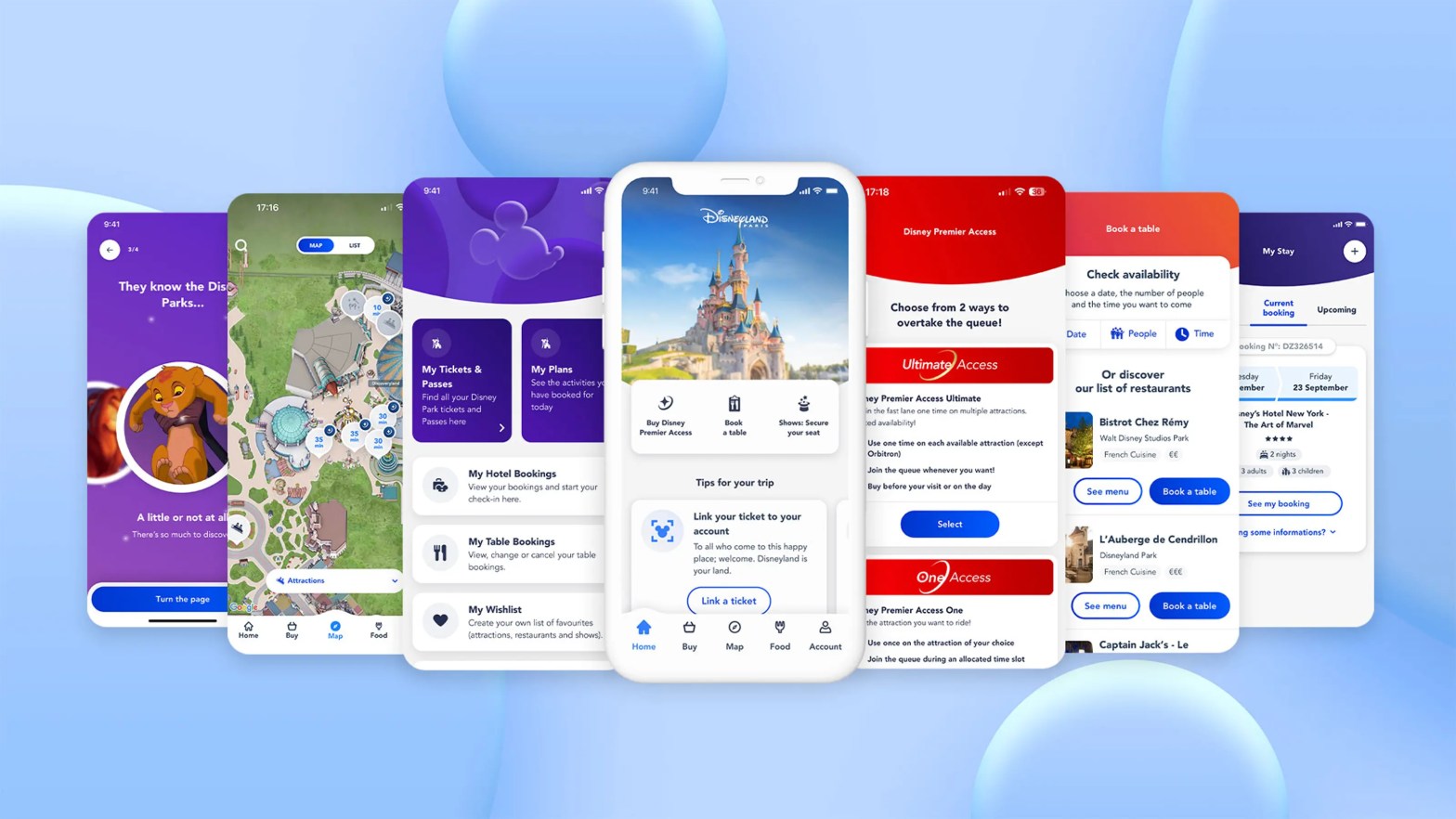
When visiting Disneyland Paris, having the official Disneyland Paris app on your smartphone can significantly enhance your experience. This handy tool offers a range of features that make navigating the parks easier, reduce waiting times, and help you plan your day more effectively. Here’s why you should download and use the Disneyland Paris app during your visit for Restaurants and Mobile Orders.
One of the standout features of the Disneyland Paris app is its ability to simplify dining experiences at the parks. Whether you’re planning a sit-down meal or grabbing a quick bite, the app offers tools to make the process smoother and more convenient. Here’s how you can use the app to book restaurants and take advantage of mobile ordering during your visit.
Booking Restaurants
Planning your meals in advance can save you time and ensure you get to enjoy the dining experiences you want, especially at popular restaurants. Here’s how the Disneyland Paris app makes restaurant bookings easy:
1. Browse and Book Dining Options
- Wide Selection: The app provides a comprehensive list of all dining options available in both Disneyland Park and Walt Disney Studios Park, as well as in Disney Village and the Disney hotels.
- Real-Time Availability: You can see which restaurants have available reservations in real-time, helping you secure a table at your preferred time and location.
- Booking in Advance: The app allows you to make reservations up to several weeks in advance, ensuring you don’t miss out on popular spots like Auberge de Cendrillon, Bistrot Chez Rémy, or Captain Jack’s.
2. Manage Reservations
- Modify or Cancel: If your plans change, you can easily modify or cancel your reservations directly through the app without having to visit the restaurant or guest services.
- Reservation Reminders: The app will send you reminders about your upcoming dining reservations, helping you stay on track with your schedule.
3. Dietary Preferences and Special Requests
- Custom Requests: When booking, you can specify any dietary restrictions or special requests, such as vegetarian meals, allergy concerns, or preferences for seating.
Mobile Ordering
For quick-service dining, the Disneyland Paris app offers a mobile ordering feature that allows you to skip the lines and have your food ready when you are.
1. How Mobile Ordering Works
- Browse Menus: The app provides digital menus for quick-service restaurants, allowing you to browse the options and decide what you’d like to order without waiting in line.
- Place Your Order: Once you’ve selected your items, you can place your order directly through the app, choosing a pick-up time that suits your schedule.
2. Skip the Queue
- Priority Pick-Up: After placing your order, you simply head to the designated pick-up counter at the selected time, where your food will be ready and waiting for you. This allows you to avoid the often long queues at popular eateries, giving you more time to enjoy the parks.
3. Payment and Receipts
- Convenient Payment: Payment is handled within the app, so there’s no need to worry about paying at the counter. You can use a variety of payment methods, making the process quick and seamless.
- Digital Receipts: The app stores your receipts digitally, making it easy to track your spending or refer back to your order details if needed.
Conclusion
Using the Disneyland Paris app to book restaurants and make use of mobile ordering can greatly enhance your dining experience during your visit. With the ability to secure reservations in advance, manage your bookings, and skip the queues at quick-service spots, you’ll find yourself with more time to enjoy the magic of Disneyland Paris. Whether you’re planning a special meal or just grabbing a quick snack, the app is an invaluable tool for making your trip as smooth and enjoyable as possible.
 Disney From Ireland