Magic Kingdom Maps: Your Guide to Navigating the Magic
Navigating Magic Kingdom can feel overwhelming at first, but with a good map in hand and a bit of planning, you’ll be able to explore the park with ease. Whether you’re looking for your next attraction, restaurant, or restroom, having a reliable guide is key to maximising your visit. Here’s everything you need to know about using maps at Magic Kingdom to make the most of your day.
Where to Find Magic Kingdom Maps
There are two main types of maps you can use to navigate Magic Kingdom: physical maps and the interactive digital map in the My Disney Experience app.
Physical Maps
- Availability: Paper maps are available at the park entrance, Guest Services, and most retail locations around the park. These maps are great for those who prefer having a physical guide to carry around.
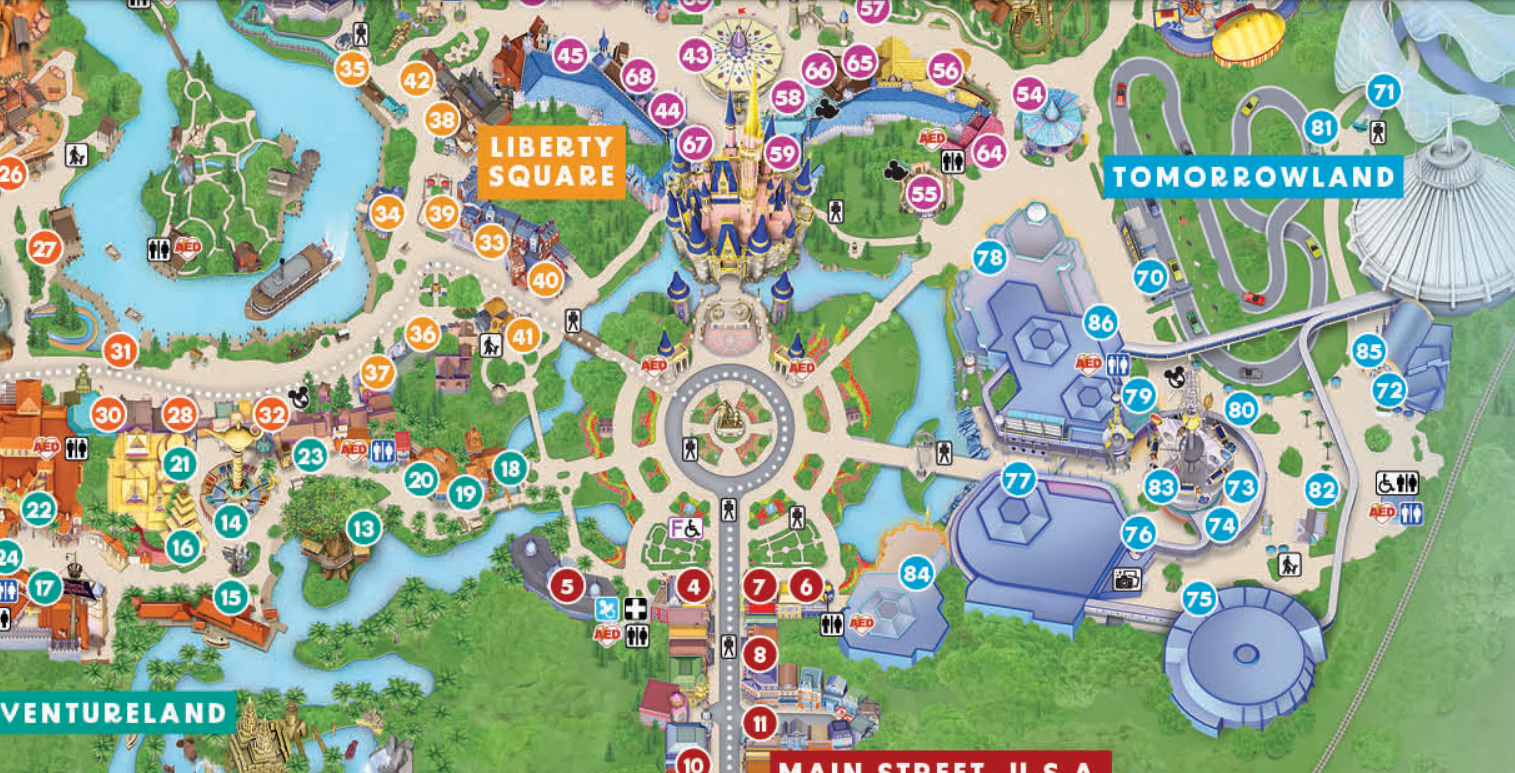
- What They Include: The physical maps show all of Magic Kingdom’s lands (Main Street, U.S.A., Adventureland, Frontierland, Liberty Square, Fantasyland, and Tomorrowland), attractions, dining spots, restrooms, and key services like First Aid and Baby Care Centers.
- Pro Tip: Grab a physical map as soon as you enter the park. It’s also helpful to take a picture of it, just in case you lose it along the way.
Digital Maps (My Disney Experience App)
- Availability: The My Disney Experience app features an interactive digital map that allows you to zoom in and out, check wait times, and even locate characters.
- Advantages: This map updates in real-time, so you can see current wait times for rides, where characters are appearing, and nearby dining options. It’s incredibly handy for quick navigation, especially when you’re on the move.
- Pro Tip: Use the filter option to highlight what you need most, like dining, attractions, restrooms, or entertainment.
Understanding the Magic Kingdom Map Layout
Magic Kingdom is divided into six themed lands surrounding Cinderella Castle in the center of the park. Here’s a quick overview of each area:
- Main Street, U.S.A.: This is the park’s entrance, featuring shops, restaurants, and the gateway to Cinderella Castle. It’s also the best spot to catch parades and fireworks shows like Happily Ever After.
- Adventureland: Home to Pirates of the Caribbean, Jungle Cruise, and the Magic Carpets of Aladdin, this land transports you to exotic jungles and thrilling adventures.
- Frontierland: Here you’ll find wild west-themed attractions like Big Thunder Mountain Railroad and Splash Mountain (soon to be Tiana’s Bayou Adventure).
- Liberty Square: Step back in time with attractions like the Haunted Mansion and the Hall of Presidents.
- Fantasyland: A must for families, Fantasyland features beloved attractions like Peter Pan’s Flight, Seven Dwarfs Mine Train, and It’s a Small World.
- Tomorrowland: Get a glimpse of the future with rides like Space Mountain, Buzz Lightyear’s Space Ranger Spin, and the Tomorrowland Transit Authority PeopleMover.
Using Maps to Plan Your Day
Magic Kingdom is a large park, so having a plan in place helps you hit your must-do attractions without wasting time criss-crossing the park.
Morning Strategy
- Start your day by focusing on one land, such as Fantasyland or Tomorrowland, and use the map to efficiently move between attractions.
- Take advantage of the My Disney Experience app to check wait times and prioritize popular rides early in the day, such as Seven Dwarfs Mine Train or Peter Pan’s Flight.
Afternoon Strategy
- By midday, the park tends to get busier, so use your map to find attractions with shorter wait times, or take a break with some of the park’s shows like Mickey’s PhilharMagic or the Enchanted Tiki Room.
- Find nearby dining spots using the map’s dining filter and consider using mobile ordering to save time.
Evening Strategy
- As crowds thin out toward the evening, use the map to check real-time wait times for attractions you missed earlier or want to revisit.
- Plan ahead for the Happily Ever After fireworks by using the map to scope out viewing spots around Main Street, U.S.A. or near Cinderella Castle.
Map Tips for Families
- Stroller Parking: Use the map to locate stroller parking areas near major attractions, like Fantasyland and Adventureland, to avoid unnecessary searching when you arrive at a ride.
- Restroom Locations: Restrooms are marked clearly on both the physical and digital maps, and some areas (like near the Baby Care Center on Main Street) have larger facilities designed for families.
- Character Meet-and-Greets: The map can help you locate where characters are meeting guests. Use the app to see real-time locations for meet-and-greets, which are perfect for toddlers and young children.
- Quiet Spots: Need a break? Use the map to find quiet areas like Tom Sawyer Island or shady spots in Liberty Square where you can rest with your little ones.
Finding Dining Locations on the Map
Magic Kingdom offers a wide variety of dining options, from quick-service snacks to full table-service meals. The map highlights all dining locations, making it easy to find food nearby. Use the filters in the My Disney Experience app to search for specific types of cuisine or dining preferences, such as:
- Quick Service: Options like Casey’s Corner and Pecos Bill Tall Tale Inn & Café are great for a quick bite.
- Table Service: Book dining at spots like Be Our Guest or Cinderella’s Royal Table directly through the app.
- Mobile Ordering: Check the map for restaurants that offer mobile ordering, such as Columbia Harbour House, to skip the lines and pick up food on the go.
Finding Rides and Attractions Quickly
If you have Genie+ reservations or Lightning Lane passes, use the map to guide you directly to your next attraction. The digital map on the app also shows current wait times, making it easy to adjust your plans on the fly. For example:
- Want a thrill? Head to Space Mountain or Big Thunder Mountain Railroad by locating them quickly on the map.
- Looking for something calm? Find attractions like The PeopleMover or it’s a small world for a more relaxed experience.
Conclusion
Navigating Magic Kingdom is easy with the help of both physical and digital maps. Whether you’re using the My Disney Experience app for real-time updates or carrying a classic paper map, you’ll be able to find everything you need, from attractions to dining spots. Plan ahead, use the map strategically, and get ready to explore all the magical corners of the park!
 Disney From Ireland